
Quick Answer
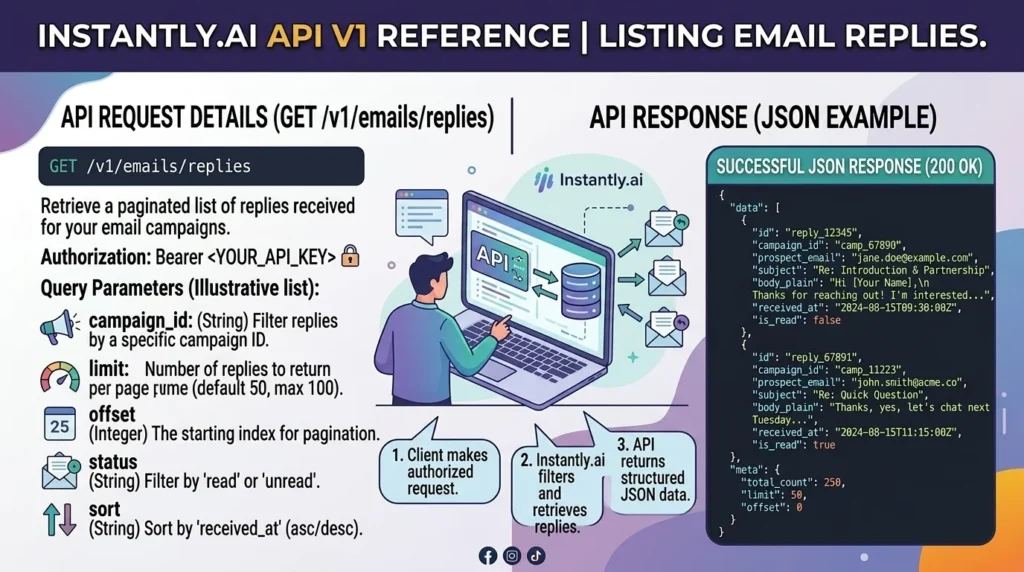
The Instantly.ai API List Emails endpoint allows developers to retrieve emails, replies, email threads, unread messages, and campaign communications programmatically. You can use filters such as campaign ID, lead email, unread status, thread ID, and email type to find specific replies and automate outreach workflows. The endpoint supports pagination and requires API authentication.
Top related searches: Instantly API list emails, Instantly API get replies, Instantly email threads API, Instantly Unibox API, Instantly email automation API
If you’re building automations around cold outreach, sales engagement, lead management, or inbox monitoring, one of the most useful Instantly endpoints is the List Emails API.
Many businesses use Instantly.ai to send outreach campaigns, but developers often need more than just sending emails. They need to retrieve replies, monitor conversations, track lead engagement, sync inbox activity with CRMs, build dashboards, and automate follow ups.
That’s where the Instantly email endpoints become valuable.
Using the List Emails endpoint, you can fetch campaign emails, manual emails, lead replies, and thread conversations directly through the API. This makes it possible to create custom integrations with CRM systems, Slack notifications, reporting dashboards, AI assistants, and lead qualification workflows.
In this guide, you’ll learn how the Instantly.ai API List Emails endpoint works, how to retrieve replies, how filtering works, and how developers commonly use email data in production systems.
What Is Instantly.ai List Emails API?
The List Emails endpoint returns email records stored inside the Instantly Unibox.
These records can include:
- Sent emails
- Received replies
- Manual emails
- Campaign emails
- Email threads
- Follow up conversations
- Inbox messages
The endpoint allows developers to retrieve email data without manually opening the dashboard.
Some common use cases include:
- CRM synchronization
- Lead engagement tracking
- Reply detection
- Email analytics
- AI reply categorization
- Sales workflow automation
- Inbox management
How The List Emails Endpoint Works
The endpoint uses a GET request.
Example endpoint:
GET /api/v2/emailsThe request returns a collection of email objects.
Each object may contain:
- Email ID
- Subject
- Sender
- Recipient
- Thread ID
- Campaign ID
- Lead ID
- Message body
- Reply information
- Read status
- Creation timestamp
The API can return multiple emails in a single request depending on the selected limit.
Authentication Requirements
Before accessing email data, authentication is required.
The API expects a Bearer token inside the request header.
Example:
Authorization: Bearer YOUR_TOKENThe endpoint requires email related read permissions.
Without proper authorization, the API returns authentication errors.
How To Retrieve Email Replies
One of the most popular use cases is finding replies from prospects.
Replies are stored as email records inside the system.
Developers typically:
- Request emails
- Filter by thread
- Identify received messages
- Process reply content
- Trigger automations
This allows systems to automatically react whenever a prospect responds to an outreach sequence.
Examples include:
- Notify sales reps
- Create CRM tasks
- Pause campaigns
- Launch AI classification
- Trigger follow ups
Important Email Fields Returned By The API
The email object contains a large amount of useful information.
Common fields include:
Email ID
Unique identifier for the email.
Subject
Email subject line.
Message ID
Unique email message identifier.
Thread ID
Used to group conversations together.
Campaign ID
Associated outreach campaign.
Lead ID
Associated prospect record.
Sender Email
Email address that sent the message.
Recipient Email
Email address receiving the message.
Email Body
Contains text and HTML versions.
Unread Status
Indicates whether the email has been read.
Timestamp
Creation and email dates.
These fields allow developers to build detailed workflows around email activity.
Filtering Replies Using Search Parameters
The endpoint supports numerous filters.
This makes it easy to find only the emails you need.
Popular filters include:
Campaign ID Filter
Retrieve emails belonging to one campaign.
Lead Email Filter
Find messages for a specific lead.
Thread Search
Retrieve emails inside a conversation thread.
Unread Filter
Find unread responses.
Email Account Filter
Retrieve messages from a particular sender account.
Email Type Filter
Limit results to received, sent, or manual emails.
Date Filters
Retrieve emails created within a specific time period.
Filtering reduces unnecessary API calls and improves performance.
Using Thread IDs To Track Conversations
Thread IDs are essential when working with replies.
A thread represents an entire conversation.
Instead of treating every message separately, developers can group messages together using the thread ID.
Benefits include:
- Easier conversation tracking
- Better CRM syncing
- Accurate reply history
- Improved AI analysis
- Cleaner reporting
Thread tracking is particularly useful when multiple replies occur between the same lead and sender.
Pagination Explained
Most outreach systems generate thousands of emails.
Returning all emails in one request would be inefficient.
Instead, Instantly uses pagination.
The API response includes:
- Email records
- Next starting point
Developers can request the next batch of emails using the pagination token provided in the previous response.
Benefits include:
- Faster requests
- Lower server load
- Better scalability
- Improved performance
Common Automation Workflows Using Email Replies
Many teams build automations around reply detection.
Popular workflows include:
Sales Notifications
Notify a salesperson immediately when a lead replies.
Slack Alerts
Send reply notifications into Slack channels.
CRM Updates
Update lead records automatically.
Lead Scoring
Increase lead scores when replies arrive.
AI Intent Classification
Determine whether replies are positive or negative.
Campaign Pausing
Prevent additional follow ups after a response.
Meeting Booking Automation
Trigger scheduling workflows.
These automations help teams respond faster and improve conversion rates.
Best Practices For Working With Instantly Email Replies
Store Thread IDs
Always save thread IDs.
They simplify conversation tracking.
Use Pagination
Avoid requesting massive datasets in one call.
Filter Whenever Possible
Retrieve only necessary emails.
Monitor Rate Limits
The endpoint uses rate limiting to protect performance.
Cache Results
Caching reduces duplicate API requests.
Process Replies Quickly
Fast response times often improve lead engagement.
Log API Errors
Maintain visibility into failed requests.
Validate Email Data
Never assume fields are always populated.
Troubleshooting Common API Issues
Authentication Errors
Usually caused by missing or invalid tokens.
Empty Results
Often caused by incorrect filters.
Missing Replies
Verify thread filters and date ranges.
Pagination Problems
Ensure the next pagination value is passed correctly.
Rate Limit Errors
Reduce request frequency and retry later.
Incomplete Data
Check whether preview mode is enabled.
Instantly API List Emails vs Get Email
Both endpoints are useful.
List Emails
Best for:
- Bulk retrieval
- Monitoring replies
- Dashboard reporting
- Workflow automation
Get Email
Best for:
- Retrieving a single email
- Detailed inspection
- Thread investigation
- Email debugging
Many integrations use both endpoints together.
Why Developers Use The List Emails Endpoint
The endpoint is valuable because email replies often represent the most important signal in outbound sales.
Developers use reply data to:
- Identify interested leads
- Trigger sales actions
- Build AI assistants
- Generate analytics
- Measure campaign performance
- Improve response times
- Create custom dashboards
Without reply monitoring, outreach automation remains incomplete.
The List Emails endpoint gives developers direct access to the communication data needed to build sophisticated sales systems.
FAQs
What is the Instantly.ai List Emails endpoint?
It is an API endpoint that returns emails, replies, threads, and inbox messages stored in Instantly.
Can I retrieve email replies using the API?
Yes. Replies are accessible through the email endpoints and can be filtered using available parameters.
Does the API support pagination?
Yes. The response includes pagination information for retrieving additional results.
Can I search by thread ID?
Yes. Thread based searching is supported through search functionality.
Can I retrieve unread emails only?
Yes. The endpoint includes an unread filter.
Can I filter emails by campaign?
Yes. Campaign filtering is supported.
Can I automate reply handling?
Yes. Many teams use the endpoint to trigger CRM updates, notifications, and AI workflows.
Is there a rate limit?
Yes. The endpoint has request limits that developers should monitor.
Conclusion
The Instantly.ai List Emails API is one of the most useful tools for developers building outreach automations, inbox monitoring systems, CRM integrations, and sales workflows. By providing access to emails, replies, thread data, unread messages, and campaign communications, it enables businesses to create intelligent systems that react instantly to prospect engagement.
you need to track replies, sync conversations with a CRM, power an AI assistant, or build analytics dashboards, the endpoint provides the data needed to make those workflows possible. When combined with proper filtering, pagination, and thread management, it becomes a powerful foundation for scalable email automation and lead management.