
Quick Answer
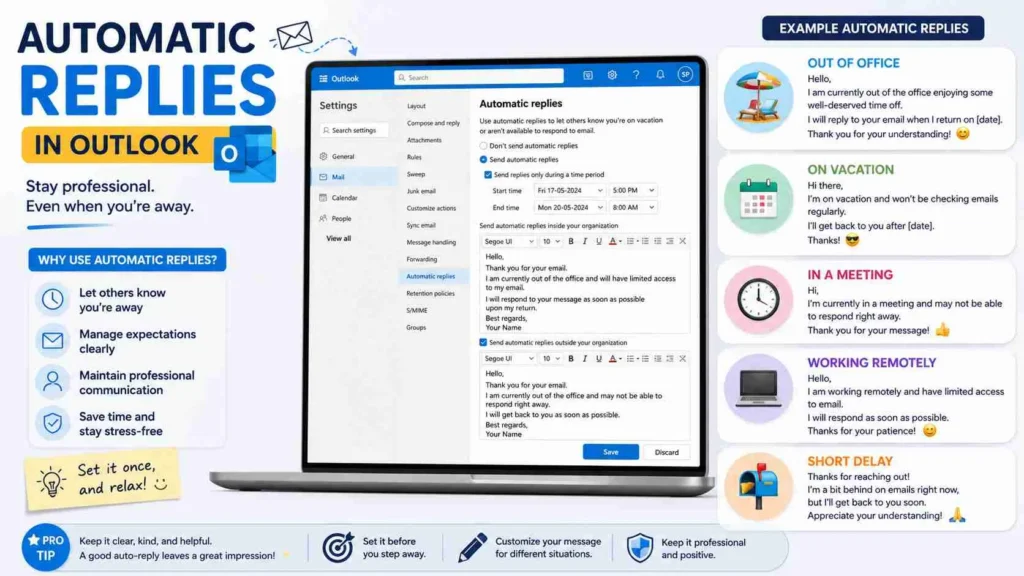
Automatic Replies in Outlook are automated email responses that are sent when you’re unavailable, out of the office, on vacation, attending meetings, or unable to respond immediately. A well-written Outlook auto reply keeps communication professional while setting clear expectations about your availability.
Top examples include: “Thank you for your email. I am currently out of the office.”, “I will respond upon my return.”, “For urgent matters, please contact my colleague.”, “I am away on annual leave.”, “Thank you for reaching out. I will get back to you soon.”
Whether you’re heading on vacation, taking a sick day, attending a conference, or simply stepping away from your inbox, setting up Automatic Replies in Outlook is one of the easiest ways to maintain professional communication.
People send emails expecting answers. However, when you’re unavailable, silence can create confusion, delays, and frustration. That’s why Outlook’s Automatic Replies feature is so valuable. It instantly informs senders that you’ve received their message while also letting them know when they can expect a response.
A great auto reply is more than just an absence notice. It reflects your professionalism, protects your time, and helps coworkers, clients, and customers find the information they need. In this guide, you’ll discover over 250 Outlook automatic reply examples categorized by different situations, industries, and communication styles, making it easy to find the perfect message for any scenario.
Professional Automatic Replies Outlook Examples
Thank you for your email. I am currently out of the office and will respond as soon as possible upon my return.
Example: General workplace absence.
Meaning: Professional acknowledgment with a response timeline.
I appreciate your message. I am away from my inbox today and will reply when I return.
Example: Short absence.
Meaning: Sets expectations clearly.
Thank you for contacting me. I am unavailable at the moment but will respond promptly once I am back.
Example: Business communication.
Meaning: Professional and courteous.
I am currently away from the office and have limited access to email.
Example: Business travel.
Meaning: Delayed responses should be expected.
Your email has been received. I will review your message as soon as I return.
Example: General business use.
Meaning: Confirms receipt.
I am unavailable today but will respond at my earliest opportunity.
Example: One day absence.
Meaning: Short-term unavailability.
Thank you for reaching out. I look forward to assisting you upon my return.
Example: Client communication.
Meaning: Friendly professionalism.
I am currently attending meetings and may be delayed in responding.
Example: Conference attendance.
Meaning: Response times may be slower.
I appreciate your patience while I am away.
Example: Professional absence.
Meaning: Shows courtesy.
I am currently unavailable and will return on the date listed below.
Example: Planned leave.
Meaning: Gives clear timing.
Thank you for your message. Your email is important and will be addressed soon.
Example: Customer communication.
Meaning: Reassurance.
I am temporarily away from email communication.
Example: General auto reply.
Meaning: Informative.
I will respond to your inquiry as soon as possible.
Example: Business correspondence.
Meaning: Professional commitment.
I appreciate your understanding during my absence.
Example: Out of office.
Meaning: Polite acknowledgment.
Thank you for contacting me. I will be back shortly and look forward to connecting.
Example: Brief absence.
Meaning: Positive and professional.
Vacation Automatic Replies Outlook Examples
Thank you for your email. I am currently on vacation and will return on [Date].
Example: Annual leave.
Meaning: Informs senders of absence.
I am enjoying some time away from the office and will respond upon my return.
Example: Holiday leave.
Meaning: Vacation notice.
I am currently out of the office on vacation with limited email access.
Example: Travel vacation.
Meaning: Delayed responses expected.
Thank you for your patience while I am away.
Example: Vacation responder.
Meaning: Appreciation.
I will return to the office on [Date] and respond as soon as possible.
Example: Planned vacation.
Meaning: Sets expectations.
I am currently taking annual leave and am unable to respond immediately.
Example: Employee leave.
Meaning: Professional notice.
Your email has been received and will be reviewed when I return.
Example: Vacation message.
Meaning: Confirms delivery.
I am away enjoying a well-earned break and will respond soon.
Example: Friendly workplace culture.
Meaning: Lighthearted professionalism.
I am currently out of the office and disconnected from work communications.
Example: Extended vacation.
Meaning: Limited availability.
For urgent assistance, please contact the alternate person listed below.
Example: Client support.
Meaning: Provides alternative help.
I will have limited internet access during my vacation.
Example: Traveling abroad.
Meaning: Delayed replies.
I appreciate your patience while I am away.
Example: Holiday leave.
Meaning: Courtesy.
I look forward to assisting you when I return.
Example: Client communication.
Meaning: Positive tone.
I am unavailable until [Date].
Example: Simple vacation reply.
Meaning: Clear timing.
Thank you for understanding and I will connect with you soon.
Example: Professional vacation message.
Meaning: Friendly closing.
Out Of Office Automatic Replies Outlook Examples
I am currently out of the office and will return on [Date].
Example: Standard OOO message.
Meaning: Clear absence notice.
Thank you for your email. I am away from the office at this time.
Example: General OOO use.
Meaning: Professional response.
I am unavailable and will respond upon my return.
Example: Short leave.
Meaning: Delayed response expected.
I am out of the office with limited access to email.
Example: Travel or meetings.
Meaning: Limited communication.
Thank you for reaching out. I look forward to connecting soon.
Example: Client communication.
Meaning: Positive professionalism.
I am currently away and unable to respond immediately.
Example: General absence.
Meaning: Response delay.
Your message has been received.
Example: Business correspondence.
Meaning: Confirmation.
I will reply at my earliest opportunity after returning.
Example: Office absence.
Meaning: Response timeline.
Please expect a delay in communication during this period.
Example: Temporary leave.
Meaning: Sets expectations.
I appreciate your patience and understanding.
Example: Professional communication.
Meaning: Courtesy.
I am currently unavailable but your email is important to me.
Example: Client communication.
Meaning: Reassurance.
Thank you for contacting me today.
Example: Generic auto reply.
Meaning: Professional acknowledgment.
I am away from my desk and will respond soon.
Example: Temporary absence.
Meaning: Short delay.
For urgent matters, please contact my colleague.
Example: Team environment.
Meaning: Alternative support.
I look forward to assisting you upon my return.
Example: Client-facing role.
Meaning: Positive follow-up.
Sick Leave Automatic Replies Outlook Examples
Thank you for your email. I am currently out of the office due to illness.
Example: Sick leave.
Meaning: Professional explanation.
I am taking sick leave and may not be able to respond immediately.
Example: Medical absence.
Meaning: Delayed replies.
I appreciate your patience while I recover.
Example: Recovery period.
Meaning: Courtesy.
I am currently unavailable due to health reasons.
Example: Professional medical leave.
Meaning: Absence notification.
Your email has been received and will be reviewed when I return.
Example: Sick leave responder.
Meaning: Confirmation.
I am away from work today and unable to access email regularly.
Example: One-day sick leave.
Meaning: Limited access.
Please contact my team for urgent matters.
Example: Workplace coverage.
Meaning: Alternative assistance.
I am currently recovering and will respond as soon as possible.
Example: Extended illness.
Meaning: Sets expectations.
Thank you for your understanding during this time.
Example: Medical leave.
Meaning: Appreciation.
I am unavailable and will return once I am medically cleared.
Example: Extended absence.
Meaning: Health-related leave.
I appreciate your patience while I am away.
Example: Sick leave communication.
Meaning: Professional courtesy.
I am temporarily unavailable due to illness.
Example: General sick leave.
Meaning: Informative.
Responses may be delayed during my absence.
Example: Medical recovery.
Meaning: Communication expectations.
Thank you for your support and understanding.
Example: Workplace absence.
Meaning: Appreciation.
I look forward to reconnecting soon.
Example: Return to work.
Meaning: Positive tone.
Holiday Automatic Replies Outlook Examples
Thank you for your email. I am currently away observing a holiday.
Example: Public holiday.
Meaning: Holiday absence notice.
I am out of the office for the holiday period and will return on [Date].
Example: Seasonal break.
Meaning: Timing information.
I appreciate your patience during the holiday season.
Example: End-of-year holidays.
Meaning: Courtesy.
I will respond after the holiday break.
Example: Company closure.
Meaning: Delayed response notice.
Our office is currently closed for the holidays.
Example: Business closure.
Meaning: Informative.
Thank you for your understanding and happy holidays.
Example: Seasonal auto reply.
Meaning: Friendly greeting.
I am currently away celebrating the holiday season.
Example: Festive leave.
Meaning: Holiday notice.
I will review your email once normal business operations resume.
Example: Holiday shutdown.
Meaning: Professional notice.
Please expect delays during this period.
Example: Busy holiday season.
Meaning: Communication expectations.
I appreciate your patience and wish you a wonderful holiday.
Example: Seasonal response.
Meaning: Warm message.
Thank you for reaching out during the holiday period.
Example: Holiday communication.
Meaning: Acknowledgment.
I look forward to assisting you after the holidays.
Example: Client communication.
Meaning: Future assistance.
The office will reopen on [Date].
Example: Holiday closure.
Meaning: Specific timing.
Your message has been received successfully.
Example: Holiday responder.
Meaning: Confirmation.
Warm wishes and thank you for your patience.
Example: Seasonal message.
Meaning: Friendly professionalism.
Customer Service Automatic Replies Outlook Examples
Thank you for contacting our support team.
Example: Customer support inbox.
Meaning: Acknowledgment.
We have received your request and will respond shortly.
Example: Service inquiries.
Meaning: Confirmation.
Your support ticket is being reviewed.
Example: Help desk.
Meaning: Status update.
Our team is working to assist you as quickly as possible.
Example: Customer service.
Meaning: Reassurance.
Thank you for your patience while we process your request.
Example: Support queue.
Meaning: Courtesy.
We appreciate your business and look forward to helping you.
Example: Customer communication.
Meaning: Positive customer experience.
A representative will contact you soon.
Example: Customer inquiries.
Meaning: Timeline.
Your inquiry is important to us.
Example: Customer care.
Meaning: Reassurance.
We are currently experiencing higher than normal volumes.
Example: Busy periods.
Meaning: Delay notice.
Thank you for reaching out to our team.
Example: General support.
Meaning: Professional acknowledgment.
We will respond as quickly as possible.
Example: Customer communication.
Meaning: Commitment.
Your message has been successfully received.
Example: Automated confirmation.
Meaning: Delivery verification.
We appreciate your patience.
Example: Support delays.
Meaning: Courtesy.
Thank you for choosing our services.
Example: Customer response.
Meaning: Appreciation.
We look forward to assisting you.
Example: Client support.
Meaning: Positive customer care.
Internal Team Automatic Replies Outlook Examples
I am currently away from my desk but will respond when available.
Example: Internal communication.
Meaning: Availability update.
I am attending meetings throughout the day.
Example: Team communication.
Meaning: Limited availability.
I will review your message upon my return.
Example: Workplace collaboration.
Meaning: Follow-up expectation.
For urgent matters, please contact my manager.
Example: Internal workflow.
Meaning: Alternative contact.
I am working remotely today and may respond more slowly than usual.
Example: Remote work.
Meaning: Availability update.
Thank you for your message.
Example: Team communication.
Meaning: Acknowledgment.
I am away from email for part of the day.
Example: Training sessions.
Meaning: Temporary delay.
Please expect a response later today.
Example: Busy schedule.
Meaning: Timeline.
I am currently focused on project work and may have delayed responses.
Example: Internal project management.
Meaning: Work prioritization.
I appreciate your patience.
Example: Workplace communication.
Meaning: Courtesy.
I will respond as soon as my schedule allows.
Example: Busy workday.
Meaning: Professional expectation.
I am temporarily unavailable.
Example: Internal notice.
Meaning: Short absence.
Thank you for understanding.
Example: Team collaboration.
Meaning: Courtesy.
I look forward to connecting soon.
Example: Workplace communication.
Meaning: Positive closing.
Please reach out again if the matter is urgent.
Example: Internal communication.
Meaning: Priority handling.
Best Automatic Replies Outlook Examples for Any Situation
Thank you for your email. I am currently unavailable and will respond as soon as possible.
Example: Universal auto reply.
Meaning: Professional and flexible.
I appreciate your message and will get back to you shortly.
Example: General business communication.
Meaning: Positive acknowledgment.
Your email has been received successfully.
Example: Universal use.
Meaning: Confirmation.
Thank you for reaching out.
Example: Any situation.
Meaning: Courtesy.
I am currently away from my inbox.
Example: Temporary absence.
Meaning: Availability update.
I will review your email upon my return.
Example: Out of office.
Meaning: Follow-up timeline.
I appreciate your patience during this time.
Example: General absence.
Meaning: Courtesy.
For urgent matters, please contact an alternate representative.
Example: Team support.
Meaning: Alternative assistance.
I look forward to assisting you soon.
Example: Customer communication.
Meaning: Positive tone.
Responses may be delayed.
Example: Busy periods.
Meaning: Expectation setting.
Thank you for understanding.
Example: Universal use.
Meaning: Appreciation.
I will return on [Date].
Example: Scheduled leave.
Meaning: Timing information.
Your message is important and will be addressed promptly.
Example: Professional communication.
Meaning: Reassurance.
Thank you for your patience and support.
Example: General absence.
Meaning: Courtesy.
I appreciate your understanding and look forward to connecting soon.
Example: Universal auto reply.
Meaning: Professional closing.
FAQs
What are Automatic Replies in Outlook?
Automatic Replies are prewritten messages Outlook sends automatically when you are unavailable.
How do I set up Automatic Replies in Outlook?
Go to File, select Automatic Replies, enable the feature, and enter your message.
What should an Outlook auto reply include?
It should include your absence dates, response expectations, and an alternate contact if needed.
Can I create different messages for internal and external contacts?
Yes. Outlook allows separate automatic replies for coworkers and external senders.
Should Outlook automatic replies be professional?
Yes. Even simple auto replies should be clear, polite, and professional.
Conclusion
Automatic Replies in Outlook are a simple but powerful tool for maintaining professional communication when you are unavailable. Whether you are on vacation, attending meetings, taking sick leave, observing a holiday, or managing customer inquiries, the right auto reply helps set expectations and keeps communication running smoothly.
By using clear, professional, and informative messages, you can ensure that coworkers, clients, and customers know exactly when and how they can expect a response. Choose the examples that best fit your situation, customize them for your needs, and keep your inbox working for you even when you are away.