
Quick Answer
An incident response plan is a documented guide that tells an organization what to do when a cybersecurity incident occurs. It defines who responds, how the threat is detected, how damage is contained, how systems are recovered, and how the team learns from the incident.
Top elements: preparation, detection, containment, eradication, recovery, lessons learned
A security incident can turn into chaos quickly when nobody knows what to do next. An incident response plan gives security, IT, management, and other teams a clear path to follow when something goes wrong. Whether the problem involves malware, ransomware, phishing, stolen credentials, unauthorized access, or a data breach, a documented plan helps people respond faster and more consistently. It also makes responsibilities clear before an emergency happens. Instead of everyone asking, “Who handles this?” or “What should we do now?”, the team can follow an established process. A strong plan isn’t just a document sitting in a folder. It should be tested, updated, and easy to use when the pressure is on.
What Is An Incident Response Plan?
An incident response plan is a documented set of procedures for identifying, managing, containing, and recovering from security incidents.
It tells an organization what actions should happen before, during, and after an incident.
Example: A company discovers suspicious activity on an employee’s computer.
Meaning: The incident response plan provides a structured process for investigating and handling the situation.
Why Is an Incident Response Plan Important?
A security incident can involve multiple people and systems at the same time.
Without a plan, teams may waste valuable time deciding who should act and what should happen next.
An incident response plan can help organizations:
- Respond faster
- Reduce confusion
- Limit potential damage
- Protect important systems
- Assign clear responsibilities
- Improve communication
- Support recovery
- Document incidents
- Improve future security
Example: A company detects ransomware on one workstation.
Meaning: A predefined response process helps the team move quickly instead of creating a strategy during the emergency.
What Are The Main Steps Of An Incident Response Plan?
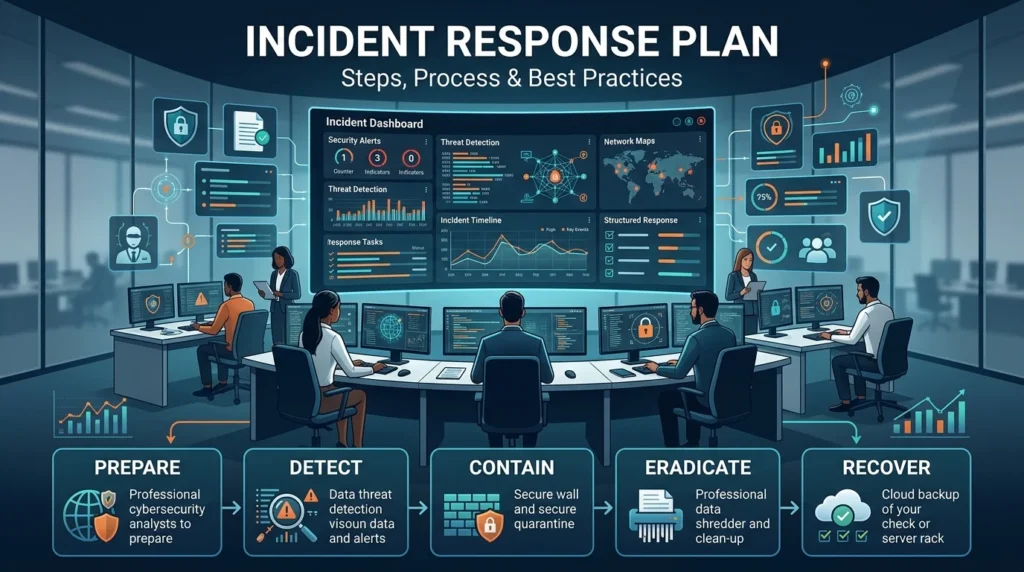
A typical incident response process includes several major stages.
| Stage | Main Purpose |
|---|---|
| Preparation | Get people and systems ready |
| Detection | Identify a possible incident |
| Analysis | Understand what happened |
| Containment | Limit the incident |
| Eradication | Remove the threat |
| Recovery | Restore normal operations |
| Lessons Learned | Improve future response |
These stages work together to create a repeatable response process.
Preparation
Preparation happens before an incident occurs.
This stage can include creating policies, assigning responsibilities, preparing tools, training employees, maintaining backups, and keeping emergency contact information current.
Example: A company creates a list of security contacts and defines who can isolate a compromised device.
Meaning: The organization is preparing to act before a real emergency happens.
Detection And Analysis
The next step is identifying and analyzing a potential incident.
Possible warning signs include:
- Unusual login activity
- Suspicious files
- Malware alerts
- Unexpected network connections
- Unauthorized account activity
- Unusual system behavior
- Employee reports
Example: A monitoring system detects multiple failed login attempts followed by a successful login.
Meaning: The security team investigates whether the activity represents an actual compromise.
Containment
Containment focuses on limiting the spread or impact of an incident.
Depending on the situation, this could involve isolating a device, disabling an account, restricting network access, or taking another appropriate protective action.
Example: Security staff isolate a compromised laptop from the network.
Meaning: The team is trying to prevent the incident from affecting additional systems.
Eradication
Eradication involves removing the cause or remaining traces of the threat.
This can include removing malicious software, fixing exploited weaknesses, or securing compromised credentials.
Example: A security team removes malware and addresses the vulnerability that allowed it to enter the system.
Meaning: The organization is working to eliminate the underlying threat.
Recovery
Recovery focuses on safely returning affected systems and services to normal operation.
Recovery activities can include:
- Restoring clean backups
- Rebuilding affected systems
- Resetting credentials
- Monitoring restored systems
- Verifying security controls
Example: A company restores an affected server from a verified clean backup.
Meaning: The organization is bringing the service back while checking that the threat has been removed.
Lessons Learned
The incident shouldn’t simply disappear from everyone’s calendar once systems are restored.
The team should review what happened and identify improvements.
Example: After a phishing incident, a company discovers that employees weren’t sure how to report suspicious emails.
Meaning: The organization can improve reporting procedures and training before another incident occurs.
Types Of Incident Response Plans
Organizations may create specific plans for different types of incidents.
Common examples include:
Data Breach Response Plan
Focuses on incidents involving potentially exposed or stolen information.
Ransomware Response Plan
Focuses on incidents involving ransomware and potentially encrypted systems or data.
Malware Response Plan
Covers malicious software infections and related containment and recovery procedures.
Phishing Response Plan
Explains how to handle suspicious emails, links, attachments, and potentially compromised accounts.
Insider Threat Response Plan
Addresses suspicious or unauthorized activity involving people with legitimate access.
Account Compromise Response Plan
Focuses on situations where credentials may have been stolen or misused.
Who Is Responsible For Incident Response?
Incident response usually involves more than the cybersecurity team.
Depending on the organization, responsibilities may involve:
- Security
- IT
- Management
- Legal
- Compliance
- Human resources
- Communications
- Business leadership
Example: The security team investigates the technical incident while management coordinates major business decisions.
Meaning: Clearly assigned responsibilities prevent people from working against each other during a crisis.
Incident Response Plan Roles And Responsibilities
A simple plan can assign responsibilities like these:
| Role | Responsibility |
|---|---|
| Incident leader | Coordinates the overall response |
| Security team | Investigates and contains threats |
| IT team | Handles affected systems |
| Management | Makes major business decisions |
| Legal | Reviews legal considerations |
| Communications | Handles appropriate messaging |
| Compliance | Reviews relevant requirements |
| HR | Handles employee-related matters |
Smaller organizations may combine several roles into one position.
Incident Response Plan Example
Imagine an employee reports that their computer is behaving strangely.
A basic response might look like this:
- The employee reports the problem.
- The security team records the incident.
- Analysts determine whether it is a real security incident.
- The affected device is contained if necessary.
- The team investigates the activity.
- The threat is removed.
- The system is restored.
- The device is monitored.
- The incident is documented.
- The team reviews what happened.
Example: A suspicious program is found on the employee’s computer.
Meaning: Each stage gives the team a clear next action.
Incident Response Plan Checklist
A practical plan should include important information such as:
- Incident response team
- Roles and responsibilities
- Emergency contacts
- Incident reporting method
- Detection procedures
- Analysis procedures
- Containment procedures
- Eradication steps
- Recovery procedures
- Communication process
- Documentation requirements
- Testing schedule
- Plan review process
Example: A company discovers that its emergency contact list is outdated.
Meaning: Regular plan reviews can catch problems before a real incident exposes them.
Incident Response Plan vs Disaster Recovery Plan
These plans are connected, but they have different primary purposes.
| Incident Response Plan | Disaster Recovery Plan |
|---|---|
| Focuses on handling incidents | Focuses on restoring operations |
| Investigates security events | Restores systems and services |
| Contains threats | Recovers business functions |
| Often security-focused | Often focused on IT and business continuity |
| Manages the incident | Helps return to normal operations |
Organizations may use both plans during a major security event.
Incident Response Plan vs Business Continuity Plan
A business continuity plan focuses on keeping critical business activities operating during disruption.
An incident response plan focuses more specifically on managing the incident itself.
Example: Security teams contain a cyberattack while business continuity teams arrange alternative ways for critical operations to continue.
Meaning: The two plans can work together during a major disruption.
How To Create An Incident Response Plan
Start by identifying the organization’s most important systems, information, and services.
Then consider the incidents that could realistically affect them.
A simple process is:
- Identify critical assets.
- Identify likely threats.
- Assign response roles.
- Define reporting procedures.
- Create containment procedures.
- Document recovery steps.
- Establish communication channels.
- Prepare important contact information.
- Test the plan.
- Update it regularly.
Example: A business identifies email accounts and customer databases as critical assets.
Meaning: The response plan can prioritize incidents affecting those systems.
How Often Should An Incident Response Plan Be Tested?
A plan should be tested regularly rather than simply written and forgotten.
Organizations can use exercises and simulations to determine whether people understand their responsibilities and whether procedures actually work.
Example: A company conducts a simulated ransomware exercise.
Meaning: The exercise can reveal missing contacts, unclear responsibilities, or recovery problems before a real attack happens.
Common Incident Response Plan Mistakes
Even a detailed plan can fail when it isn’t practical.
Common mistakes include:
- Not assigning clear roles
- Using outdated contact information
- Never testing the plan
- Making procedures unnecessarily complicated
- Forgetting documentation
- Ignoring communication
- Not updating the plan
- Assuming every incident is handled the same way
Example: Employees don’t know who should be contacted after a suspected data breach.
Meaning: The plan exists, but it isn’t useful because the reporting process isn’t clear.
Incident Response Plan Best Practices
A strong plan should be:
- Clear
- Practical
- Easy to find
- Easy to understand
- Regularly tested
- Regularly updated
- Appropriate for the organization’s risks
It’s also useful to keep separate procedures for major incident types instead of trying to force every situation into one generic checklist.
Example: A ransomware procedure includes specific containment and recovery considerations.
Meaning: Incident-specific guidance can make the response more efficient.
How Incident Response Plans Help With Ransomware
Ransomware can affect multiple systems quickly, making preparation particularly important.
A ransomware response plan can define how the organization should:
- Identify affected systems
- Contain the incident
- Protect unaffected systems
- Investigate the attack
- Assess available backups
- Coordinate communications
- Restore systems safely
- Review the incident afterward
Example: Several computers suddenly become inaccessible.
Meaning: A predefined ransomware procedure helps the team respond systematically instead of reacting randomly.
How Incident Response Plans Help With Phishing
Phishing incidents can begin with something as simple as one employee clicking a malicious link.
A phishing response plan can establish what employees should report and what security teams should investigate.
Example: An employee enters their password into a suspicious website.
Meaning: The response process can guide the organization through securing the account and investigating related activity.
How Incident Response Plans Help With Data Breaches
A suspected data breach may require technical investigation as well as coordination between security, management, legal, and compliance teams.
A response plan helps establish who should be involved and what information should be documented.
Example: An organization discovers unauthorized access to a database.
Meaning: A structured process helps the organization investigate the incident and coordinate the appropriate response.
FAQs
What is an incident response plan?
An incident response plan is a documented guide explaining how an organization should prepare for, identify, contain, investigate, and recover from security incidents.
What are the main steps in an incident response plan?
The main stages are preparation, detection and analysis, containment, eradication, recovery, and lessons learned.
Why is an incident response plan important?
It gives teams a clear process to follow, helping reduce confusion and improve the speed and consistency of their response.
Who creates an incident response plan?
Security, IT, management, legal, compliance, and other relevant teams may contribute to the plan.
What should an incident response plan include?
It should include roles, reporting procedures, detection, containment, eradication, recovery, communication, documentation, and testing procedures.
What is an example of an incident response plan?
A simple example starts with reporting a suspicious event, analyzing it, containing the threat, removing the cause, recovering systems, and reviewing the incident.
How often should an incident response plan be updated?
It should be reviewed regularly and whenever major changes occur to systems, people, risks, or business operations.
Should an incident response plan be tested?
Yes. Testing helps identify weaknesses in procedures, communication, responsibilities, and recovery.
What is the difference between incident response and disaster recovery?
Incident response focuses on managing the incident, while disaster recovery focuses primarily on restoring systems and operations.
What incidents should an incident response plan cover?
It can cover ransomware, malware, phishing, data breaches, stolen credentials, unauthorized access, insider threats, and other security incidents.
Can small businesses have an incident response plan?
Yes. A small business can create a simpler plan based on its most important systems, likely risks, available staff, and recovery needs.
What is the goal of incident response?
The goal is to manage an incident effectively, reduce its impact, restore normal operations, and learn from the event.
Conclusion
An incident response plan gives an organization a practical roadmap for dealing with cybersecurity incidents. Instead of scrambling when something goes wrong, teams can follow predefined steps, understand their responsibilities, and coordinate their actions more effectively. A useful plan should cover preparation, detection, analysis, containment, eradication, recovery, and lessons learned.
The plan also shouldn’t be treated like a document that gets written once and forgotten. Regular testing and updates are what make it useful when a real incident occurs. Whether the organization is dealing with ransomware, phishing, malware, unauthorized access, or a data breach, having a clear response process can make a difficult situation much easier to manage.
See Also More :
- 200+ Happy Mother’s Day Replies: That Are Sweet, Emotional & Perfect to Send
- 300+ How to See Replies on X (Twitter): Complete Guide for Mobile, Desktop and Hidden Conversations 2026