

Quick Answer
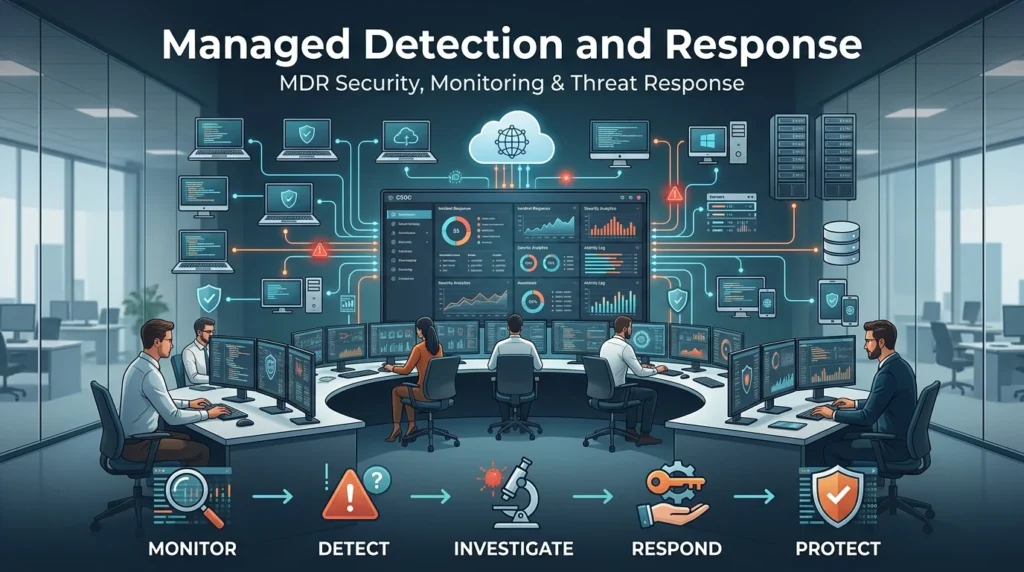
Managed Detection and Response (MDR) is a cybersecurity service where security specialists continuously monitor an organization’s systems, investigate suspicious activity, and help respond to threats. It gives businesses access to ongoing security monitoring and expert response without needing to build a large in-house security team.
Top elements: 24/7 monitoring, threat detection, security analysts, incident response, threat hunting
Cyberattacks don’t exactly respect office hours. A suspicious login can happen at midnight, ransomware can start spreading on a weekend, and a compromised account won’t wait for Monday morning. That’s where managed detection and response comes in. MDR combines security technology with human cybersecurity expertise to monitor an organization’s environment, investigate potential threats, and help respond when something suspicious appears. It’s especially useful for businesses that don’t have enough internal security staff to provide around-the-clock monitoring. Instead of simply generating alerts and leaving someone to figure them out, an MDR service typically adds investigation and response capabilities. In simple terms, it’s like having an external security team watching your digital environment and helping deal with threats when they show up.
What Is Managed Detection and Response?
Managed Detection and Response, commonly called MDR, is a cybersecurity service that combines continuous security monitoring, threat detection, investigation, and response support.
An MDR provider typically uses security technologies along with cybersecurity analysts to identify and investigate suspicious activity.
Example: A business detects unusual activity from an employee account late at night.
Meaning: An MDR team can investigate the activity and help determine whether it represents a genuine security threat.
How Does Managed Detection and Response Work?
MDR generally combines technology, monitoring, threat intelligence, and human expertise.
A typical process looks like this:
- Security data is collected.
- Monitoring systems identify suspicious activity.
- Analysts investigate potential threats.
- The incident is analyzed and prioritized.
- The MDR team recommends or performs appropriate response actions.
- The organization is informed about significant findings.
Example: A suspicious process appears on a company laptop.
Meaning: MDR analysts can investigate the activity instead of treating every automated alert as a confirmed attack.
What Does MDR Monitor?
The exact coverage depends on the provider and service, but MDR may monitor areas such as:
- Endpoints
- Servers
- Cloud environments
- Network activity
- Identity systems
- User activity
- Security logs
- Applications
Example: A company has employees working from laptops and cloud applications.
Meaning: MDR can provide monitoring across multiple parts of that environment when the service supports them.
What Is MDR Used For?
MDR is designed to help organizations identify and respond to cybersecurity threats.
Common use cases include:
- Malware detection
- Ransomware detection
- Account compromise
- Suspicious login activity
- Endpoint threats
- Network attacks
- Credential theft
- Threat hunting
- Security incident investigation
Example: Several failed logins are followed by a successful login from an unusual location.
Meaning: MDR analysts can investigate whether the account may have been compromised.
Why Is Managed Detection and Response Important?
Security tools can generate large numbers of alerts, but an alert isn’t automatically an attack.
MDR adds human analysis to help determine which events deserve attention.
Example: A security system generates hundreds of alerts during normal business activity.
Meaning: MDR analysts can investigate suspicious events and prioritize the ones that may represent genuine threats.
MDR vs Traditional Managed Security Services
MDR and traditional managed security services can overlap, but MDR generally places stronger emphasis on threat detection, investigation, and response.
| MDR | Traditional Managed Security |
|---|---|
| Focuses on detection and response | May focus heavily on monitoring |
| Human threat investigation | Monitoring may be more alert-oriented |
| Threat hunting may be included | Threat hunting varies |
| Incident response support | Response capabilities vary |
| Security operations focus | Broader managed security services |
The exact capabilities depend on the provider.
MDR vs EDR
EDR, or Endpoint Detection and Response, is primarily a technology designed to monitor and respond to activity on endpoints.
MDR is a managed service that can use EDR and other technologies while providing human security expertise.
| EDR | MDR |
|---|---|
| Security technology | Managed cybersecurity service |
| Primarily endpoint-focused | Can cover multiple security environments |
| Collects endpoint activity | Monitors and investigates security events |
| Provides detection capabilities | Adds human analysis and response support |
| Requires organizational management | Provider manages much of the monitoring |
Example: EDR detects suspicious activity on a laptop.
Meaning: An MDR team can investigate the alert and help determine what should happen next.
MDR vs XDR
XDR, or Extended Detection and Response, is a security technology approach that combines data and detection across multiple security sources.
MDR is a managed service that may use XDR as one of its underlying technologies.
Example: An MDR provider uses an XDR platform to correlate endpoint, identity, and network events.
Meaning: The provider can use multiple security data sources to investigate threats.
What Is 24/7 MDR Monitoring?
Many MDR services offer continuous monitoring, including nights, weekends, and holidays.
This can help organizations that don’t have an internal security team available around the clock.
Example: A suspicious event occurs at 2 a.m.
Meaning: A 24/7 MDR service may be able to investigate the event even when the organization’s regular IT staff are offline.
What Is Threat Hunting In MDR?
Threat hunting involves proactively searching for suspicious activity that automated security systems may not have clearly identified.
Instead of waiting for a major alert, analysts look for patterns that could indicate an attacker is already present.
Example: Analysts search for unusual authentication patterns across an organization’s environment.
Meaning: Threat hunting can help identify potentially suspicious activity that might otherwise remain unnoticed.
What Is MDR Incident Response?
MDR incident response involves investigating a confirmed or suspected threat and helping the organization take appropriate action.
Depending on the service, response capabilities may include:
- Endpoint isolation
- Blocking malicious activity
- Disabling compromised accounts
- Removing malicious files
- Containing affected systems
- Providing investigation guidance
Example: An endpoint appears to be infected with malware.
Meaning: The MDR team may help contain the device and investigate how the infection occurred.
Benefits Of Managed Detection and Response
MDR can provide several advantages.
24/7 Security Monitoring
Organizations can receive continuous monitoring without building a large overnight security team.
Access To Security Expertise
Businesses can gain access to analysts with specialized cybersecurity skills.
Faster Investigation
Potential threats can be investigated rather than simply appearing as unanswered alerts.
Threat Hunting
Some MDR services proactively search for suspicious activity.
Response Support
MDR can help organizations respond to security incidents.
Reduced Security Workload
Internal IT teams can focus on other responsibilities while the MDR provider handles agreed security monitoring tasks.
Who Needs MDR?
MDR can be useful for organizations that:
- Lack a large security team
- Need 24/7 monitoring
- Have limited cybersecurity expertise
- Generate too many security alerts
- Want additional threat-hunting capabilities
- Need incident response support
Example: A growing company has IT staff but no dedicated SOC.
Meaning: MDR can provide access to security monitoring and expertise without requiring the company to build a full SOC from scratch.
MDR For Small Businesses
Small businesses can face many of the same cyber threats as larger organizations but may have fewer security resources.
MDR can help fill that gap.
Example: A small company has only a few IT employees who already manage devices, networks, and business applications.
Meaning: An MDR provider can take on some continuous security monitoring responsibilities.
MDR For Large Organizations
Larger organizations may also use MDR to extend their existing security operations.
Example: An enterprise already has a security team but needs additional overnight monitoring.
Meaning: MDR can supplement internal capabilities rather than completely replacing them.
What Does An MDR Provider Do?
An MDR provider typically performs activities such as:
- Security monitoring
- Alert investigation
- Threat detection
- Threat hunting
- Incident analysis
- Response assistance
- Security reporting
The exact services vary between providers.
Example: A provider notices suspicious activity and contacts the organization’s security team with investigation details.
Meaning: The organization receives additional security expertise when it matters.
MDR Alert Triage
Alert triage is the process of reviewing security alerts and determining their importance.
Not every alert represents a serious incident.
Example: A security platform generates an alert for an unusual application.
Meaning: An MDR analyst investigates whether the activity is legitimate, suspicious, or malicious.
MDR And False Positives
False positives happen when legitimate activity is incorrectly flagged as suspicious.
MDR analysts can investigate alerts and help distinguish ordinary behavior from potential threats.
Example: An administrator runs a legitimate script that triggers a security alert.
Meaning: Analyst investigation can determine that the activity is authorized rather than malicious.
MDR And Ransomware
Ransomware can spread quickly, so early detection and response are important.
MDR can help organizations monitor for suspicious behavior associated with ransomware and investigate alerts when they occur.
Example: A large number of files begin changing unexpectedly on several endpoints.
Meaning: MDR analysts can investigate whether the behavior may indicate ransomware activity.
MDR And Phishing
Phishing attacks often attempt to steal credentials or convince employees to interact with malicious content.
MDR services may help identify suspicious activity that follows a phishing incident.
Example: An employee enters credentials into a fake login page and unusual authentication activity follows.
Meaning: MDR analysts can investigate the account activity and help coordinate an appropriate response.
MDR And Cloud Security
Many businesses rely heavily on cloud services.
Depending on the provider, MDR may monitor cloud activity and investigate suspicious behavior within supported cloud environments.
Example: An account suddenly performs unusual administrative actions in a cloud environment.
Meaning: MDR monitoring can help identify activity that deserves investigation.
MDR And Identity Security
Identity-related attacks can involve stolen credentials, suspicious logins, privilege abuse, or unusual account behavior.
MDR can correlate identity activity with other security events when the necessary data is available.
Example: A user logs in from an unusual location and immediately accesses sensitive resources.
Meaning: The combined activity may warrant investigation.
How To Choose An MDR Provider
Organizations should evaluate MDR providers based on their actual security needs.
Consider:
- 24/7 monitoring
- Detection capabilities
- Response options
- Supported technologies
- Endpoint coverage
- Cloud coverage
- Identity monitoring
- Threat hunting
- Incident response
- Reporting
- Communication process
- Integration options
- Service-level agreements
Example: A company relies heavily on cloud applications.
Meaning: It should verify that the MDR service can monitor the relevant cloud environment.
MDR Implementation Steps
A typical MDR deployment may involve:
- Identifying important systems.
- Defining security requirements.
- Connecting supported security technologies.
- Configuring monitoring.
- Establishing alert priorities.
- Defining communication procedures.
- Testing response processes.
- Reviewing the service regularly.
Example: A company connects its endpoint security platform to an MDR provider.
Meaning: The provider can begin receiving and analyzing supported security data.
Common MDR Challenges
MDR can provide valuable support, but it isn’t completely hands-off.
Potential challenges include:
- Integration complexity
- Alert volume
- Communication delays
- Limited visibility
- Provider dependency
- Service costs
- Misaligned expectations
- Incomplete asset coverage
Example: Several important systems aren’t connected to the MDR service.
Meaning: The provider may not have enough visibility to detect activity occurring on those systems.
MDR Best Practices
Organizations can get more value from MDR by:
- Clearly defining responsibilities
- Connecting important security data sources
- Maintaining accurate asset inventories
- Establishing escalation procedures
- Testing response capabilities
- Reviewing reports
- Updating integrations
- Communicating with the provider regularly
Example: A company regularly reviews which endpoints are covered by its MDR service.
Meaning: Coverage checks help identify monitoring gaps.
MDR Example
Imagine a company receives an alert showing that an employee’s credentials may have been compromised.
The MDR team:
- Reviews the authentication activity.
- Checks related endpoint activity.
- Looks for additional suspicious behavior.
- Determines the severity.
- Notifies the organization.
- Recommends or performs agreed response actions.
- Continues monitoring for related activity.
Example: Additional suspicious logins appear after the first alert.
Meaning: The MDR investigation can help reveal whether the incident extends beyond one account.
MDR Checklist
Before selecting or deploying MDR, organizations can review:
- 24/7 monitoring requirements
- Critical assets identified
- Endpoint coverage
- Cloud coverage
- Identity coverage
- Network visibility
- Threat-hunting requirements
- Response permissions
- Escalation contacts
- Reporting requirements
- Integration requirements
- Service-level expectations
- Testing process
FAQs
What does managed detection and response mean?
Managed Detection and Response is a cybersecurity service that provides ongoing security monitoring, threat detection, investigation, and response support.
What does MDR stand for?
MDR stands for Managed Detection and Response.
Is MDR a cybersecurity service?
Yes. MDR is a managed cybersecurity service that combines security technology with human expertise.
What does an MDR provider do?
An MDR provider monitors security activity, investigates potential threats, performs threat hunting when included, and helps organizations respond to incidents.
Is MDR the same as EDR?
No. EDR is primarily a security technology focused on endpoint detection and response. MDR is a managed service that may use EDR and other technologies.
Is MDR the same as XDR?
No. XDR is a technology approach for correlating security information across multiple environments, while MDR is a managed service that can use XDR as part of its technology stack.
Does MDR provide 24/7 monitoring?
Many MDR providers offer 24/7 monitoring, but organizations should verify this when evaluating a specific service.
What is threat hunting in MDR?
Threat hunting is the proactive search for suspicious activity that may not have triggered a clear automated alert.
Who needs MDR?
MDR can be useful for organizations that need continuous monitoring or security expertise but don’t have enough internal resources to provide those capabilities themselves.
Can MDR stop ransomware?
MDR can help detect and respond to suspicious ransomware-related activity, but no security service can guarantee that every ransomware attack will be prevented.
Can MDR monitor cloud environments?
Some MDR services support cloud monitoring. The exact coverage depends on the provider and technologies being used.
What are the benefits of MDR?
Common benefits include continuous monitoring, expert investigation, threat hunting, faster detection, and incident response support.
Is MDR worth it for a small business?
It can be valuable for a small business that lacks dedicated security staff and needs continuous security monitoring.
Does MDR replace an internal security team?
Not necessarily. MDR can supplement an internal team by handling monitoring, investigation, threat hunting, or response tasks defined in the service agreement.
Conclusion
Managed Detection and Response gives organizations a practical way to strengthen cybersecurity monitoring without building every security capability internally. By combining security technology with human analysts, MDR can help identify suspicious activity, investigate alerts, hunt for potential threats, and support incident response.
It’s particularly useful when a business needs continuous monitoring but doesn’t have enough security staff to provide it around the clock. Still, choosing MDR isn’t simply about picking a provider with the biggest feature list. Organizations should look at coverage, response capabilities, integrations, communication procedures, and the systems that actually need protection. When those pieces line up, MDR can become a valuable extension of an organization’s security team.
See Also More :
- 300+ How to See Replies on X (Twitter): Complete Guide for Mobile, Desktop and Hidden Conversations 2026
- 200+ Happy Mother’s Day Replies: That Are Sweet, Emotional & Perfect to Send