

Quick Answer
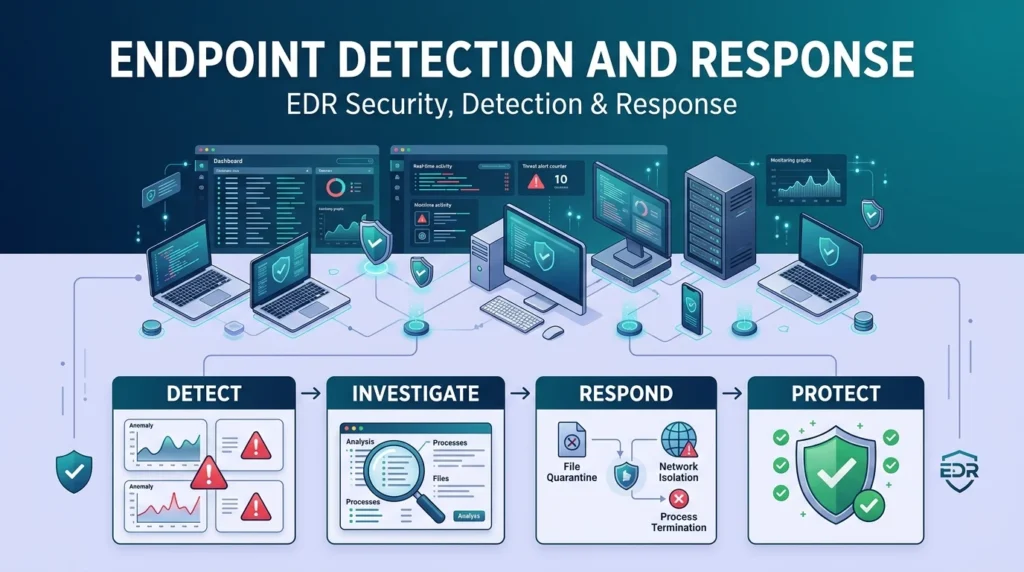
Endpoint Detection and Response (EDR) is a cybersecurity technology that continuously monitors devices such as computers, laptops, and servers for suspicious activity. It collects security data, detects possible threats, helps security teams investigate incidents, and supports rapid response when an attack is found.
Top features: endpoint monitoring, threat detection, investigation, incident response, automated protection
Every laptop, desktop, and server connected to a business network can become a doorway for attackers. That’s why simply installing antivirus software isn’t always enough. Endpoint detection and response gives security teams a broader view of what is happening across their devices. Instead of only looking for known malware, EDR continuously watches endpoint activity and can help identify suspicious behavior, investigate incidents, and respond to threats. It can be especially useful when a security team needs to understand what happened before, during, and after an attack. In simple terms, EDR helps organizations keep an eye on their endpoints and react when something doesn’t look right.
What Is Endpoint Detection and Response?
Endpoint Detection and Response, commonly called EDR, is a cybersecurity solution designed to monitor endpoint devices and detect suspicious activity.
Endpoints can include:
- Laptops
- Desktop computers
- Servers
- Workstations
- Corporate devices
EDR collects activity data from these devices and analyzes it for potential security threats.
Example: A company’s security team notices unusual activity on an employee’s laptop.
Meaning: EDR can help identify the activity, investigate it, and determine whether the device has been compromised.
How Does Endpoint Detection and Response Work?
EDR typically works by collecting endpoint activity and sending security information to a central platform.
The system can monitor things such as:
- Processes
- File activity
- Network connections
- Login activity
- System changes
- Application behavior
The security platform then analyzes this information to identify suspicious patterns.
Example: An unknown program suddenly starts making unusual network connections.
Meaning: EDR can flag the behavior for investigation.
What Does EDR Detect?
EDR can help security teams detect different types of suspicious activity.
These can include:
- Malware
- Ransomware
- Suspicious scripts
- Credential theft
- Unauthorized access
- Malicious processes
- Unusual network activity
- File manipulation
- Insider-related activity
Example: A program begins modifying a large number of files unexpectedly.
Meaning: EDR may recognize the behavior as suspicious and alert the security team.
What Is Endpoint Detection?
Endpoint detection is the part of EDR focused on finding suspicious or potentially malicious activity on devices.
Unlike a simple security alert that only says something went wrong, EDR can provide additional information about the activity surrounding an event.
Example: A suspicious executable starts running on a workstation.
Meaning: The security team can investigate what launched it, what files it accessed, and what other activity followed.
What Is Endpoint Response?
Endpoint response refers to the actions taken after suspicious activity has been identified.
Depending on the EDR platform and organization, response actions may include:
- Isolating an endpoint
- Stopping a suspicious process
- Quarantining a file
- Blocking malicious activity
- Collecting additional evidence
- Removing a threat
Example: A workstation appears to be infected with ransomware.
Meaning: Security staff can isolate the endpoint to reduce the chance of the threat spreading.
Why Is EDR Important?
Modern attacks can move quickly, and security teams need visibility into what is happening on their devices.
EDR can help organizations:
- Detect threats earlier
- Investigate suspicious activity
- Understand attack behavior
- Respond faster
- Reduce potential damage
- Monitor endpoints continuously
- Improve incident investigation
Example: An attacker gains access to one employee’s computer.
Meaning: EDR can help the security team investigate the activity before the attacker causes more damage.
EDR vs Traditional Antivirus
EDR and traditional antivirus are related, but they serve different purposes.
| Traditional Antivirus | EDR |
|---|---|
| Focuses heavily on malware prevention | Focuses on detection, investigation, and response |
| Often relies on known threat indicators | Can analyze suspicious behavior |
| Provides endpoint protection | Provides broader endpoint visibility |
| Usually simpler to manage | Provides deeper security investigation capabilities |
| Limited incident investigation | Detailed activity information |
Modern antivirus products can also include advanced detection features, so the distinction isn’t always absolute.
EDR vs XDR
EDR focuses primarily on endpoints.
XDR, or Extended Detection and Response, expands detection and response across multiple security layers.
| EDR | XDR |
|---|---|
| Focuses on endpoints | Combines multiple security sources |
| Endpoint activity | Endpoint, network, cloud, email, and other data |
| Detailed device visibility | Broader security visibility |
| Endpoint-focused response | Cross-environment response |
An organization may use EDR as one part of a broader XDR strategy.
What Are EDR Agents?
An EDR agent is software installed on an endpoint that collects security-related information.
The agent can monitor activity and communicate relevant information to the central EDR platform.
Example: An organization installs an EDR agent on company laptops.
Meaning: The security platform can receive endpoint activity from those devices.
What Is EDR Telemetry?
EDR telemetry is the security-related data collected from endpoints.
It can include information about:
- Processes
- Files
- Connections
- Users
- Applications
- System events
This information helps security teams investigate suspicious behavior.
Example: Investigators need to know what happened on a computer before a malware alert.
Meaning: EDR telemetry can provide useful historical activity for the investigation.
How EDR Helps With Incident Response
EDR can be an important part of an organization’s incident response process.
When an incident occurs, security teams can use endpoint information to:
- Identify affected devices.
- Investigate suspicious activity.
- Determine how the incident started.
- Contain affected endpoints.
- Remove or block threats.
- Monitor systems after recovery.
Example: Several employees report unusual computer behavior.
Meaning: Security teams can use EDR data to investigate whether the devices are connected to the same incident.
Benefits Of Endpoint Detection And Response
EDR provides several important security benefits.
Continuous Monitoring
EDR can continuously monitor endpoint activity rather than checking devices only after an alert.
Faster Detection
Suspicious behavior can trigger alerts that help security teams investigate potential threats sooner.
Better Investigation
Detailed endpoint information can help analysts understand what happened.
Rapid Response
Security teams can respond to certain threats directly from the EDR platform.
Improved Visibility
Organizations gain greater visibility into activity occurring across managed endpoints.
Limitations Of EDR
EDR isn’t a magic shield.
It can still have limitations, including:
- False positives
- Large amounts of security data
- Configuration challenges
- Resource requirements
- Visibility gaps
- Need for skilled security analysts
- Potential evasion by sophisticated attackers
Example: An organization deploys EDR but doesn’t have enough staff to review important alerts.
Meaning: Having the technology isn’t enough. The organization also needs an effective monitoring and response process.
How To Choose An EDR Solution
Organizations should consider several factors when evaluating EDR.
Look at:
- Supported operating systems
- Detection capabilities
- Investigation features
- Response options
- Integration with other security tools
- Reporting
- Scalability
- Ease of management
- Alert quality
- Data retention
- Deployment requirements
Example: A company has Windows, macOS, and Linux endpoints.
Meaning: It should make sure the selected EDR solution supports the required environments.
EDR Best Practices
A strong EDR deployment should be supported by good security processes.
Useful practices include:
- Keep endpoint agents updated.
- Monitor important alerts.
- Establish clear response procedures.
- Review false positives.
- Limit unnecessary endpoint access.
- Test response procedures.
- Protect EDR management accounts.
- Regularly review endpoint coverage.
- Train security staff.
Example: A company discovers that several servers don’t have EDR coverage.
Meaning: Regular coverage checks can identify security gaps before an incident occurs.
EDR In A Security Operations Center
Security Operations Centers, or SOCs, often use EDR as part of their monitoring and investigation process.
Analysts can review endpoint alerts, investigate suspicious behavior, and connect endpoint activity with other security events.
Example: A SOC receives an alert about suspicious PowerShell activity.
Meaning: Analysts can investigate the process, user, device, and related activity to determine whether the behavior is legitimate.
Endpoint Detection And Response Example
Imagine an employee accidentally opens a malicious attachment.
The attachment launches a suspicious process that attempts to modify files and communicate with an unusual external system.
An EDR platform may:
- Detect the suspicious process.
- Generate an alert.
- Record related endpoint activity.
- Help the analyst investigate.
- Isolate the affected device if necessary.
- Support threat removal.
- Continue monitoring the endpoint.
This gives the security team more information than simply knowing that malware was detected.
FAQs
What does endpoint detection and response mean?
Endpoint Detection and Response, or EDR, is cybersecurity technology that monitors endpoint activity to detect, investigate, and respond to potential threats.
What is an endpoint in cybersecurity?
An endpoint is a device connected to a network, such as a laptop, desktop computer, or server.
What does EDR stand for?
EDR stands for Endpoint Detection and Response.
What does EDR detect?
EDR can detect suspicious behavior associated with malware, ransomware, unauthorized access, malicious processes, and other security threats.
Is EDR the same as antivirus?
No. Antivirus focuses heavily on preventing and detecting malicious software, while EDR provides deeper endpoint monitoring, investigation, and response capabilities.
What is an EDR agent?
An EDR agent is software installed on an endpoint that collects security information and communicates with the EDR platform.
What is EDR telemetry?
EDR telemetry is the security-related data collected from endpoints, including information about processes, files, users, applications, and network activity.
Conclusion
Endpoint Detection and Response has become an important part of modern cybersecurity because organizations need more than basic malware detection. EDR provides continuous endpoint visibility, helps identify suspicious behavior, supports investigations, and can give security teams practical response options when an incident occurs.
The biggest advantage is context. Instead of simply receiving an alert that something suspicious happened, security teams can often investigate the activity surrounding that event and understand what happened on the device. Still, EDR works best when combined with trained security staff, clear incident response procedures, regular updates, and other layers of protection.
See Also More :
- 200+ Happy Mother’s Day Replies: That Are Sweet, Emotional & Perfect to Send
300+ How to See Replies on X (Twitter): Complete Guide for Mobile, Desktop and Hidden Conversations 2026